My Photoshop students know-- Actions are just one of the many ways that Adobe Photoshop has worked to automate your workflow and make editing of photos easier.
While I want you to know how to use Photoshop and understand the functions and processes involved in everything you do in Photoshop, I also love the ability to automate repetetive actions and to learn new things as you study and adjust Actions.
My first Action that I have made for my student's usage is CWP-Sharp as a Tack. This Action will sharpen your image using a High Pass Filter, one of the best ways to sharpen your image, but one of the lesser known.
I will be posting later the Action Recipe for how you can do this, or you can look at my Photoshop Extras page for this and future Actions for my students.

Showing posts with label tutorials. Show all posts
Showing posts with label tutorials. Show all posts
Saturday, April 9, 2011

Tuesday, April 5, 2011
{Making the Most of Your Point and Shoot Camera}
Point and Shoot digital cameras have come a long way from the simple 2MP still image recorders of just a few years ago. Today, a wide variety of creative styles and inexpensive editing software has changed the world of digital photography to the level of art, even for those who cannot afford expensive professional cameras.
This series will cover basics of using your point and shoot digital camera beyond the automatic settings and quick fixes that you can do to when it seems like your camera just doesn’t “get” what you want it to do.
One of the most popular features of point and shoot cameras is their numerous Creative Settings. One of the most powerful is the Portrait setting. This setting is most often symbolized as a woman's profile, sometimes in a hat. This setting will do two things- it will make the point of focus crisp and clear while blurring out the background (commonly called bokeh) and will meter the exposure based upon the subject of the portrait rather than the surrounding background.
This setting, naturally, is useful for portrait photography, but it can also be useful for still life photography where you would like to have a singular subject in focus and the surrounding area blurred.
What should the Portrait setting not be used for? It functions poorly as a setting for landscape photography where you want a large area of your image in focus. Some cameras also have issues in the portrait setting when they are trying to photograph larger groups of people. The camera wants to have a smaller area in focus, and so people in the background or along the sides of the image may not be in focus.
Up Next in Making the Most of Your Point and Shoot Camera: The Sports Creative Setting.
Saturday, March 26, 2011
{Basic Digital Photography Tips} The Terrible Trio- ISO
This article is the first of a series of three articles of digital photography tips for beginning photographers looking learn the basics of how their digital camera works, and how to get a properly exposed image. Perhaps the most easily understood of the three main components of a proper exposure in digital photography, ISO simply put, is your camera's "film's" sensitivity to light.
Now, if only the name of ISO was as easy to understand. ISO stands for "International Standards Organization," which really has no bearing on its function, so feel free to forget it now. I know it is unusual for an instructor to tell you to forget something, but beginning in the world of digital photography can be a bit overwhelming, so one fewer thing to remember can be welcome.
Now, think way back to a time before the common nature of digital cameras and photography, to when you were taking a family vacation and needed to go buy film so that you could capture the memories of the museum, beach or Grandma's house. One of the few things you probably considered besides the brand and price was the number prominently featured on the side of the box.
I always felt safe buying a box labelled ISO 400, and the same is true today. In your camera's setting is a setting for ISO, or you can leave this setting up to your camera. If you have done so, you can also look back through past images already on your camera and see that many of them in generally good light were probably shot around an ISO of 400.
However, what do we do if we don't have the greatest light? Say you are going to Grandma's house or a museum where the lighting might not be ideal. What should you set your ISO at to avoid annoying blurs or too dark images, or the dreaded flashface?
The important thing to remember is the higher the number you set your ISO at, the greater is your camera's sensitivity to light. So Higher ISO=A Lighter Image with all of the same settings for everything else. You're probably wondering then Carrie, why don't we want to use a high ISO all the time and never have a blur we don't want, never have an image that is too dark?

 We ideally would like to keep ISO at as small a number as possible because the easier it is for your sensor to absorb light, unfortunately it is also easier for your camera to have unwanted "noise" in the image. This term is analogous to unwanted background sounds in audio recordings.
Now, if only the name of ISO was as easy to understand. ISO stands for "International Standards Organization," which really has no bearing on its function, so feel free to forget it now. I know it is unusual for an instructor to tell you to forget something, but beginning in the world of digital photography can be a bit overwhelming, so one fewer thing to remember can be welcome.
Now, think way back to a time before the common nature of digital cameras and photography, to when you were taking a family vacation and needed to go buy film so that you could capture the memories of the museum, beach or Grandma's house. One of the few things you probably considered besides the brand and price was the number prominently featured on the side of the box.
I always felt safe buying a box labelled ISO 400, and the same is true today. In your camera's setting is a setting for ISO, or you can leave this setting up to your camera. If you have done so, you can also look back through past images already on your camera and see that many of them in generally good light were probably shot around an ISO of 400.
However, what do we do if we don't have the greatest light? Say you are going to Grandma's house or a museum where the lighting might not be ideal. What should you set your ISO at to avoid annoying blurs or too dark images, or the dreaded flashface?
The important thing to remember is the higher the number you set your ISO at, the greater is your camera's sensitivity to light. So Higher ISO=A Lighter Image with all of the same settings for everything else. You're probably wondering then Carrie, why don't we want to use a high ISO all the time and never have a blur we don't want, never have an image that is too dark?
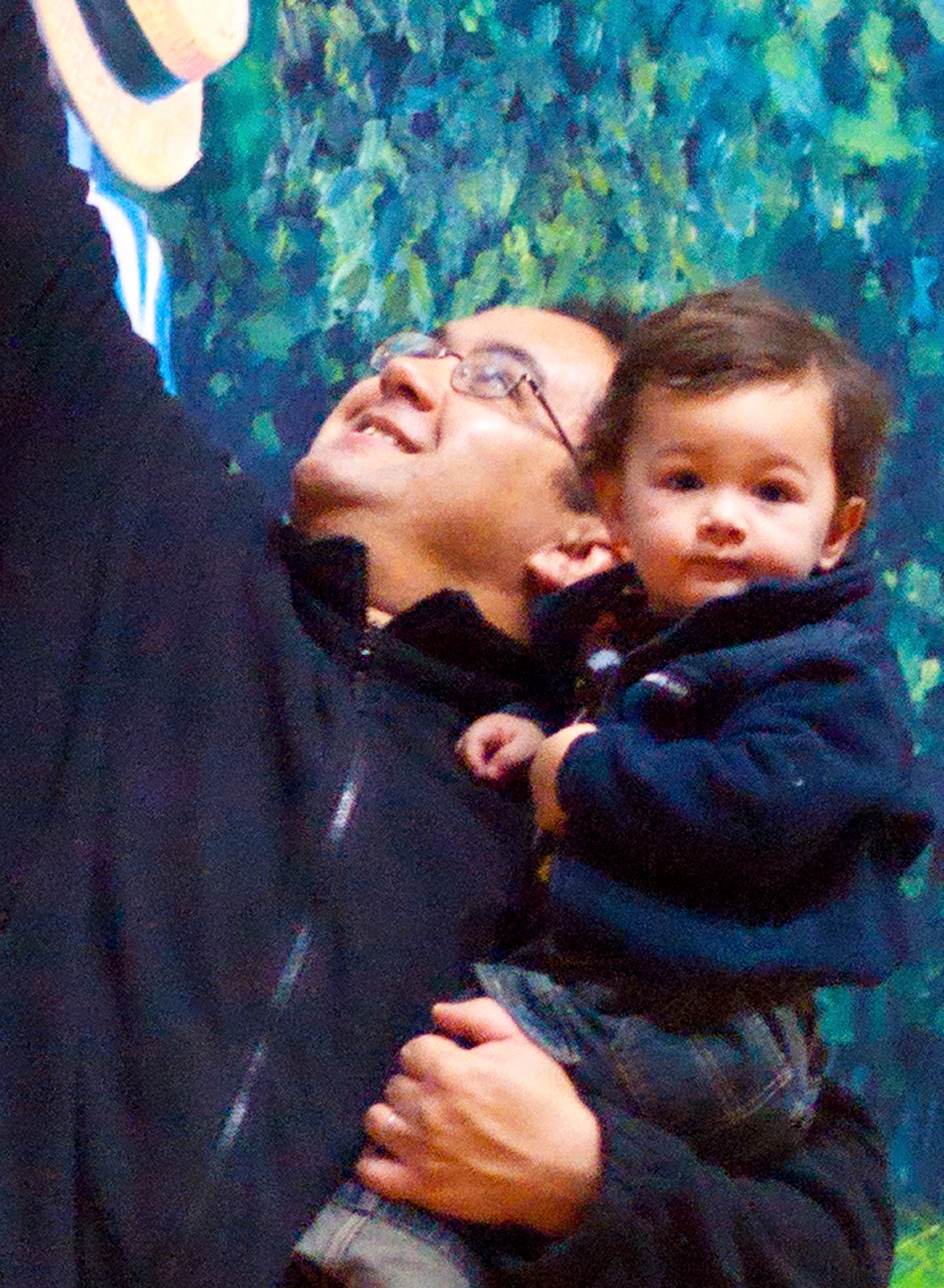
 We ideally would like to keep ISO at as small a number as possible because the easier it is for your sensor to absorb light, unfortunately it is also easier for your camera to have unwanted "noise" in the image. This term is analogous to unwanted background sounds in audio recordings.
 A few of you may have seen this example in one of my Beginning Digital Photography classes; In the photo on the left, you can see my husband and son in the low-light environment of a museum back in our hometown in MI. You will notice that there is something about the image that looks a bit off, and when you come in closer in the crop on the right, you can see that both of their jackets appear to have small dots of color on them, as well as their faces. This is noise.
In horrible lighting conditions, you may have to raise your ISO up as high as it will go to have any chance of an okay photograph. You have only a very few other options, which are to change one of the other three main aspects of exposure that we are discussing in this series:
{Basic Digital Photography Tips} The Terrible Trio- Aperture
{Basic Digital Photography Tips} The Terrible Trio- Shutter Speed
So get out there- practice, and be the boss of your camera!
Wednesday, February 16, 2011
Basics of Non-Auto Photography

Once you know these basics and have control over these three components of a properly exposed image, you can use this knowledge to create great images in a wide variety of lighting, and not just when your camera happens to guess correctly how you want your photo to work.
In photography, the three main technical components affecting image exposure, depth of field and a whole slew of other really important things are Aperture, Shutter Speed and ISO. We cover the Terrible Trio in class, but each of these three vital components to photography deserves more time and attention than we can give in class, and so this series, Basics of Non-Auto Photography, we will spend a little time exploring each of these, and hopefully remind you that you are smarter than your camera and you have to tell it what to do.
So grab your camera and manual, get ready to spin some dials away from Auto, and learn to harness the technology at your fingertips.
Wednesday, February 9, 2011
Welcome Students!
Welcome Fridley Comunity Ed Photography students!
Here you will find supplemental readings on topics that I only have a brief time to cover in class as well as information on upcoming class sessions, samples of photographs taken in class, and any important announcements.
I am so happy that you are interested in learning more about what makes your camera tick, and want to learn to capture better images of your family, friends and the world around you!
Here you will find supplemental readings on topics that I only have a brief time to cover in class as well as information on upcoming class sessions, samples of photographs taken in class, and any important announcements.
I am so happy that you are interested in learning more about what makes your camera tick, and want to learn to capture better images of your family, friends and the world around you!
Subscribe to:
Posts (Atom)